Estimates and invoices for lawn care, handymen and painters.
PaidNote is the iPhone app for small lawn care shops, handymen, painters and solo service pros. Write it on the job, send it yourself from the truck, and see who has paid.
Coming soon to the App StoreiPhone only, iOS 17 or later. No account, no ads.
See it in action

Bill regular yards on schedule PRO
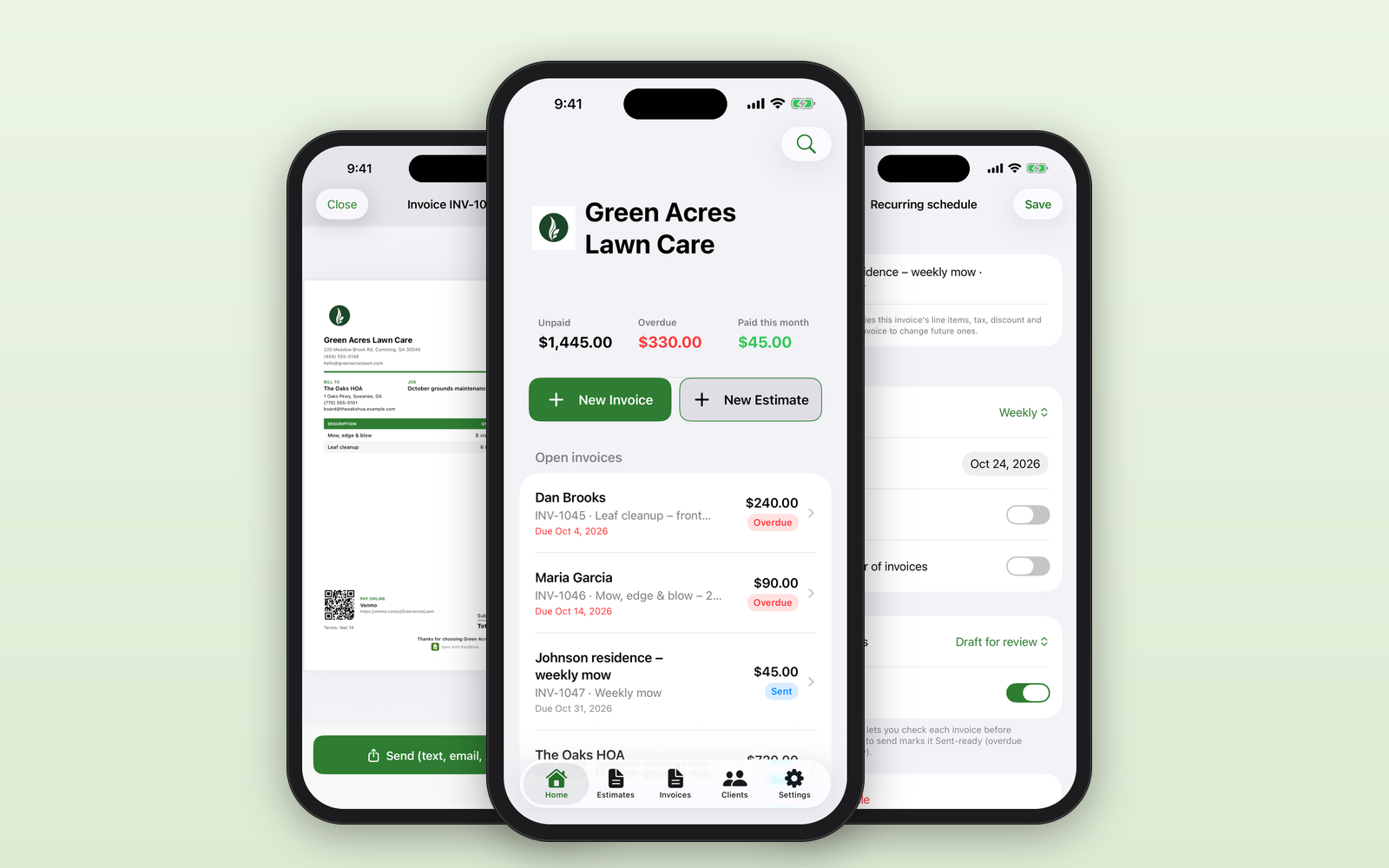
Set up weekly to quarterly invoices once. PaidNote creates each one on schedule for you to review and send yourself. It never sends anything on its own.

See who owes you
Unpaid, overdue and paid at a glance on the home screen.

Estimate to invoice in one tap
Approved job? Convert the estimate into an invoice instantly.

Get paid by QR code PRO
Branded PDF invoices with your payment link and QR code.

Photos and signatures PRO
Add before-and-after job photos and capture a signature on screen.

Friendly overdue reminders PRO
A pre-written, friendly reminder message that you choose to send, your way.

Tax time, sorted PRO
Year-end income report plus CSV export.

Start free, upgrade anytime
No account. No ads. Your data in your own iCloud.
Made for the way you actually work
Recurring invoices PRO
Weekly, every 2 weeks, every 4 weeks, monthly or quarterly. PaidNote creates each invoice from your template as a draft to review (or ready to send) and lets you know when invoices are ready.
You stay in control
PaidNote never emails or texts your customers on its own. You send every invoice yourself, by text, email or any app, through your iPhone's share sheet.
Estimate to invoice in one tap
Build estimates from saved items like mowing, cleanups, mulch or labor. When it's approved, one tap turns it into an invoice.
Professional PDFs
Your logo, brand color, license number, payment terms and footer note on a clean letter-size PDF. Invoice numbers and due dates are handled for you.
Know who owes you
Unpaid, Overdue and Paid this month on the home screen. Record full or partial payments by cash, check, Zelle, Venmo, card or other.
Get paid faster PRO
Your own payment link and QR code on the invoice, deposits and receipts, customer signatures on estimates, overdue reminders on your phone.
Job photos PRO
Add before-and-after photos to estimates and invoices.
Year-end report PRO
Income by month, by payment method and by client, ready for tax time. Export everything to Excel or CSV anytime.
Easy switch from other apps
Import your clients and saved items from a CSV file. PaidNote matches the columns for you, shows a preview and skips duplicates.
Works where you work
Big buttons, works offline, light and dark mode. Fill in clients from your Contacts.
Your data stays yours
No account, no login, no ads, no analytics. Your data stays on your iPhone and syncs through your own private iCloud.
Simple pricing
Start free: your first documents are free, and anything you create always stays viewable. Upgrade to PaidNote Pro for unlimited documents and all Pro features. PaidNote Pro: $9.99/month or $79/year, with a 2-week free trial for new subscribers.
Monthly
per month
Yearly
per year (about 34% less than paying monthly)
US prices. Subscriptions are billed through your Apple Account and renew automatically unless cancelled at least 24 hours before the end of the current period. Manage or cancel any time in your Apple Account settings. Prices in other countries are set by the App Store and may differ.
FAQ
Does PaidNote send invoices to my customers automatically?
No. Recurring invoices are created for you on schedule, but you always send them yourself from your iPhone's share sheet (Messages, Mail or any app). PaidNote never contacts your customers.
Do I need to create an account?
No. There's no login. Your data is stored on your iPhone and, if iCloud is on, synced through your own private iCloud account.
Can my customers pay by card through PaidNote?
PaidNote doesn't process payments. With Pro you can add your own payment link (for example from a payment service you already use) and a QR code to the invoice PDF, and record payments you receive by cash, check, Zelle, Venmo, card or other.
Does it work without cell signal?
Yes. You can create and edit estimates and invoices offline. iCloud sync catches up when you're back online.
I'm switching from another invoice app. Can I bring my clients?
Yes. Export your clients or saved items from your old app as a CSV file, then import it into PaidNote. PaidNote matches the columns automatically, shows you a preview before anything is added, and skips duplicates. Import reads CSV files only (not Excel .xlsx), so save or export as CSV first.
I use PaidNote on two devices. Could a recurring invoice be created twice?
It can happen. If two devices (for example an iPhone and an iPad) are both offline when a recurring invoice comes due, each one may create that invoice before they sync. After your devices are back online and synced, check your recurring invoices for duplicates and delete the extra one before sending.
When does PaidNote ask to send me notifications?
Only when it's useful: when you turn on overdue reminders, save your first recurring invoice schedule, or send your first invoice as a Pro user. PaidNote never asks when you first open the app. Notifications are local to your iPhone, and you can change them anytime in Settings.
Is there an Android or web version?
Not right now. PaidNote is an iPhone app (iOS 17 or later).
What if I stop subscribing?
Everything you created stays viewable, and you can export your data to Excel or CSV.
Who is PaidNote for?
Owner-operators and small crews: lawn care, handymen, painters, pool techs, cleaners. If you need dispatching or crew scheduling, a bigger field-service tool may suit you better.